
How to Use GenAI#
Generative AI offers countless possibilities, but the sheer number of use cases can overwhelm even the most experienced educator. It’s easy to fall into the trap of thinking you should be using AI for everything simply because others are. Instead, the most effective approach is to focus on your immediate needs and build from there. One well-chosen use case, implemented thoughtfully, is far more valuable than a dozen half-used ones.
Furthermore, just as you expect students to use AI as a tool rather than a substitute for their own work, the same standard applies to teachers. AI can give you a first draft, suggest changes, or offer new perspectives, but it’s your responsibility to fact-check, verify, and refine before you share or implement anything.
Finding Your Use#
The first step is identifying where AI can make a meaningful difference for you right now. You can do this in multiple ways:
Exchange prompts, workflows, and discoveries with colleagues. Seeing how others approach similar challenges often sparks ideas you wouldn’t think of alone.
Use this book and the internet to find unique uses. For example, the advanced lesson planning workflows can show you what’s possible. You can even follow-up by having a conversation with the custom AI companion from this book. Be specific and it can suggest custom prompts or workflows tailored to you.
Navigating the Tools#
For simplicity, you can think of AI tools in education as falling into three broad categories, each with distinct strengths and ideal use cases:
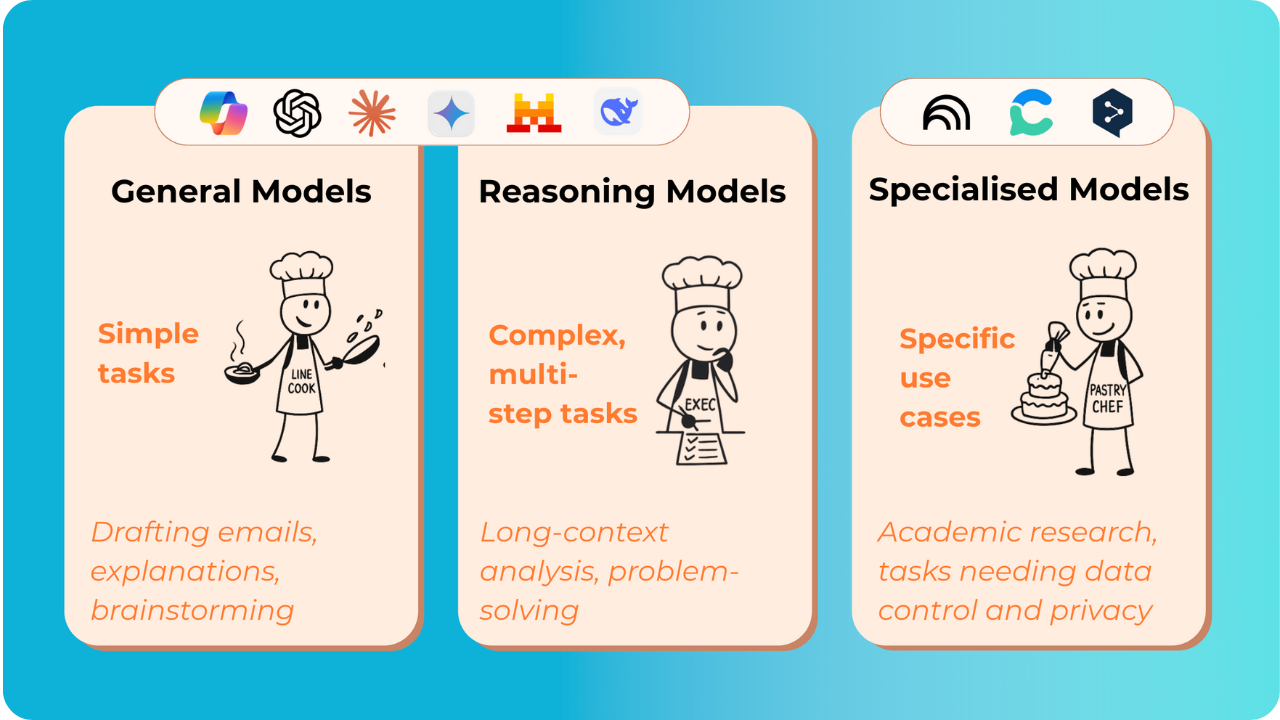
1A. General models (eg. CoPilot, ChatGPT, Claude, Gemini, Mistral, DeepSeek etc.) are the standard large language models most people start with. They excel at a wide range of everyday tasks: drafting emails, explaining concepts, summarizing articles, and brainstorming ideas. Think of them like versatile line cooks who can handle most dishes and work across different cuisines with solid all-around skills.
1B. Reasoning models often come from the same providers but are specifically designed for complex thinking tasks. These models hold context longer, make connections across multiple pieces of information, and tackle intricate problem-solving that requires extended thought. They’re like executive chefs planning elaborate tasting menus, thinking through how flavors build across courses, solving timing challenges, and dealing with multi-step preparations.
The choice between general and reasoning models depends entirely on your task’s complexity. Use reasoning models when your query requires deep analysis or multi-step thinking. Some platforms now even auto-select the best model for you based on your prompt’s complexity. Since both types often come from the same provider, both of the models share access to available tools like internet browsing, voice assistants, and image creation.
2. Specialized tools (eg. NotebookLM, Consensus, DeepL etc.) focus on specific purposes like academic research or data privacy. NotebookLM, for example, doesn’t store chats in the memory and works only with sources you provide, unlike general models that draw from their entire training dataset. While this makes specialized tools more factual and reliable, they’re often less creative and worse at general writing. They’re like pastry chefs who’ve mastered their domain with precise techniques and reliable results, but ask them to grill a steak and they’re out of their element.
This trade-off perfectly illustrates why matching tools to tasks matters. For example, in a literature analysis I’d choose NotebookLM because it won’t fabricate claims and instead directly states when information isn’t available. However, for creative writing or brainstorming, I’d prefer a general model’s flexibility and imagination.
Optional: Using local models
Some educators also explore local models, which directly run on a computer instead of a server, for maximum privacy or control. These work similarly to cloud-based LLMs but require technical setup and significant computing power. If you’re curious about the potential of open-source options without the technical complexity, platforms like Together AI Playground offer access to various models through a single interface.
Furthermore, if you want to dig deeper into model performance, the Hugging Face AI Energy Score Leaderboard is a useful resource. It compares open models on energy efficiency giving you more insight about which tools align with your teaching and priorities.
The key insight is that there’s no single “best” type of model. The choice depends entirely on how you use it. For TU Delft, Copilot is the preferred tool due to institutional support and data privacy compliance. You can always reference the TU Delft software finder to see what is and isn’t permitted to use. You can also visit the TU Delft intranet AI guidelines for the university’s AI policies.
Staying Up to Date#
The constant rollout of new features and updates can feel overwhelming, making you feel perpetually behind. Don’t let this worry you. Focus instead on the fundamental principles and practices discussed throughout this book as these will serve you well regardless of which specific tools you choose. Furthermore, instead of chasing every new tool, focus on mastering the fundamental use cases that are most valuable to you. However, if you still want to stay current, the AI Advantage Resource Database offers a great ranking of the best tools, and the Rundown Email Newsletter offers daily updates on the latest in AI.
My Biggest AI Tips#
If you’re not getting the output you want, it’s likely because your prompt has been misinterpreted. The easiest way to fix this is to have the AI ask for clarification by adding the following at the end of your prompt:
First, ask me 5 questions that will improve the response you will be giving me. Wait for my response before continuing.
This forces the model to analyze your request and identify the specific details it still needs, ensuring the final output is far more accurate and tailored to what you’re actually looking for. This method is by far one of the most helpful strategies for getting the output you want, and it’s a simple change you can apply anytime.
When working with specific sources (such as data, academic papers, articles, etc.) it’s best to use tools designed for that purpose. I recommend using NotebookLM, as it bases its answers only on the information you’ve provided. This design choice dramatically reduces the risk of hallucinations, where AI makes up information or produces incorrect numbers.
Beyond this, NotebookLM offers several other beneficial features for understanding complex sources. For example, it can create audio overviews and video lectures tailored to your documents. In the second level 3 workflow you can see how NotebookLM can be used to generate audio overviews of papers which you can be used in lectures.
However, the power of these tools is only as good as the sources you provide. The biggest challenge here is selecting the right, high-quality information to begin with.
Using AI without a clear prompt is like asking a builder to “just make a house.” You’ll get something, but it might not be what you wanted. Hence, I like to incorporate the following which I find particularly effective:
Define the Task Clearly: State what you want the AI to do. Examples: “Generate potential research questions related to…”, “Summarize key findings from these research papers…”, “Create a syllabus outline for a course on…”.
Provide Context: Provide background information. Who is the target audience (students, fellow researchers)? What are the learning objectives? Example: “Create a syllabus outline for a first-year bachelor course on sustainable engineering, focusing on circular economy principles.”
Supply exemplars: Give examples of the desired output. This drastically improves quality. Example: If asking for research questions, provide examples of well-formulated research questions in the relevant field. If asking for a syllabus, provide an example syllabus or a link to one.
Assign a Persona: Tell the LLM who it should be “acting” as. Example: “Act as a leading expert in blockchain…” or “Act as an experienced TU Delft professor designing a new course…”. This adds context implicitly. Instead of explicitly stating “professors value conciseness, passion for the subject, and use simple language,” you simply say “act as a university professor,” and the LLM draws on its training data to infer these characteristics.
Specify the Format: Tell the LLM how you want the output formatted. Examples: “Use bullet points,” “Create a table,” “Write a concise abstract,” “Format as a LaTeX document.”
Set the Tone: Define the desired tone of voice. Examples: “Use a formal, academic tone,” “Use an engaging and accessible tone for undergraduate students,” “Use a concise and technical tone suitable for a scientific publication.”
Optional Video: Click here for a walkthrough of this prompting approach explained by Jeff Su
Remember, this is just one way to structure prompts, the most important principle is simply providing enough detail and context for the AI to understand exactly what you need. Remember that the custom AI assistant can help you create prompts and workflows tailored to your specific use cases as well.